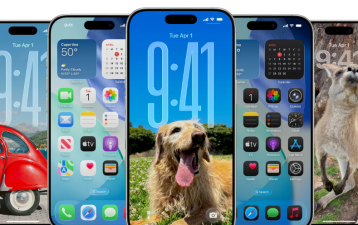
Every year before WWDC, Apple fans eagerly await the major announcements of the next-generation iOS system. This time, the 12 core upgrades of iOS 27 have been fully revealed, featuring comprehensive AI integration, maxed-out performance, and a completely refreshed design—arguably Apple's most substantial system update in the past three years! After seeing this upgrade list, you'll understand why Apple fans across the internet are shouting, "This is a must!" WWDC 2026 is scheduled for June 9th-13th, with the first day featuring the release of new systems like iOS 27 and macOS 27, as well as new hardware. This year's theme is "Let's Get a Sneak Peek," and the interface continues to use the liquid glass design for a more transparent visual experience.
AI Focus Upgrade: The iPhone Finally Goes From "Obedient" to "Understands You"
This is the core trump card of iOS 27 and a crucial step for Apple in catching up with the AI wave. Previously, Siri passively executed commands, but the upgraded AI system proactively understands your needs: for example, reminding you to catch a flight based on your schedule, recommending outfits based on the weather, and even adjusting Do Not Disturb mode based on your sleep data. The system is no longer a cold tool, but a smart assistant that understands you, upgrading from "you ask, it answers" to "it anticipates your needs," completely changing the logic of human-computer interaction.
Performance and Experience Optimization: Older Models Can "Fight for Another Three Years"
The curse of "upgrading makes things sluggish" has finally been broken! iOS 27 optimizes the underlying scheduling for all models, comprehensively resolving old issues such as background process killing, touch latency, and lag under high load. The official promise is "lower power consumption and more responsive operation," especially for the iPhone 14/15/16 series. After upgrading, the smoothness is comparable to a new phone; everyday tasks like watching videos, playing games, and running multiple apps are all smooth and stress-free. Users of older models no longer need to agonize over whether to upgrade.
Liquid Glass 2.0: A Complete UI Overhaul, Pro-Level Quality
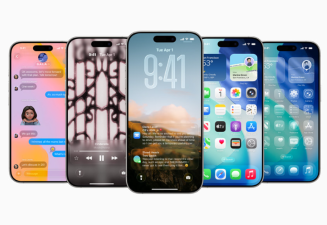
Visual enthusiasts rejoice! The new liquid glass design upgrade makes system icons, widgets, and interface lighting more transparent and natural, maximizing the sense of depth. Instead of overly flashy design, it uses light and shadow gradients and dynamic effects to make the entire system look more premium, especially the lock screen, control center, and app icons, which have a quality comparable to the exclusive design of Pro models. Regular iPhone users can also enjoy a flagship-level visual experience.
Automatic Video Subtitle Generation
This feature is incredibly powerful and useful! The device automatically generates subtitles for videos that don't have them! And it doesn't require internet downloads; it's entirely based on local AI processing and won't reveal any privacy information about your videos.
Apple Intelligence Photos: Built-in Photo Editing Tool, Even Beginners Can Create Masterpieces
No more downloading third-party photo editing apps! iOS 27 comes with built-in AI photo editing features, including one-click removal of passersby, AI image enlargement, intelligent color correction, video background blur, and even image quality restoration for old photos and background replacement for videos. Photos taken casually are automatically optimized for lighting and composition by AI, and can be posted directly to social media as is, making it easy for even those with no photography skills to create atmospheric masterpieces.
Enhanced Battery Life and Management: Say Goodbye to Three Charges a Day, Battery Health is More Controllable
Battery anxiety is finally over! The system intelligently recognizes your usage habits and dynamically adjusts power consumption: for example, it automatically reduces background activity when you sleep, optimizes location and network power consumption during commutes, and protects battery health and extends battery life based on your charging habits. More accurate battery health predictions and charging reminders allow you to monitor your battery status at any time, and even older models can say goodbye to "water-draining" batteries.
Apple Health+: AI helps you manage your health, understanding your body better than you understand it.
Health data is no longer just cold, hard numbers! AI integrates your steps, sleep, heart rate, and exercise data to generate a personalized health report and provide individualized suggestions: such as reminders to get up after prolonged sitting, adjustments to your sleep schedule, and even exercise recommendations based on your heart rate changes. It's like having a personal health consultant in your phone, constantly monitoring your physical condition.
Privacy and Security Upgrade: AI Processing Completed Locally, Data Never Leaked Again
This is Apple's "security bombshell"! All AI functions utilize on-device intelligent processing; all your data is processed locally and not uploaded to the cloud, ensuring both the convenience of AI functions and avoiding the risk of privacy leaks. At the same time, app permission control is strengthened; any software that accesses the camera or microphone without authorization will trigger a real-time alert, maximizing privacy and security.
Satellite Connectivity Upgrade: Send Messages Even in Remote Areas, Outdoor Enthusiasts Rejoice!
The iPhone's satellite communication capabilities have taken a qualitative leap! Communication is more stable, coverage is wider, and connectivity in outdoor scenarios is significantly improved. In remote mountainous areas or uninhabited areas with no signal, sending emergency messages and sharing your location is more stable and has lower latency, providing an extra layer of security for frequent hikers and campers.
A New AirPods Pairing Experience: Seamless Switching, Automatic Adaptation to Your Scenarios
A boon for AirPods users! Pairing and switching speeds with iPhones have been significantly improved, making the transition from your phone to your iPad or Mac virtually seamless—no more manual disconnecting and reconnecting. It also supports scene-aware functionality, automatically activating noise cancellation during commutes, switching to transparency mode during office work, and optimizing audio effects during exercise. No manual settings are required; the headphones automatically adapt to your usage scenario.